A transparent PNG looks simple: an image with no background that sits cleanly on top of anything. But anyone who has downloaded a “transparent” file and found a white box around it knows it does not always work that way. This guide explains what a transparent PNG actually is, how to tell whether a file is truly transparent, why backgrounds sometimes reappear, and how to use these images in digital and printable projects. You will also find a quick format comparison and practical tips for saving files correctly. By the end, you will be able to spot a fake transparent PNG in seconds and choose the right file for your next design.
What Is a Transparent PNG?
A transparent PNG is an image file in the PNG format where some pixels are see-through. The most common use is a subject, such as a plant, icon, or illustration, with no background around it. You can drop it onto a colored page, a photo, or a pattern, and whatever is underneath shows through the empty areas.
How the Alpha Channel Works
Most images store three color values for each pixel: red, green, and blue. A PNG can add a fourth value called the alpha channel, which stores how opaque each pixel is. A fully opaque pixel is solid, a fully transparent pixel is invisible, and values in between create partial transparency.
That partial transparency is what makes edges look smooth. Instead of a hard, jagged cutout, the outline of a subject can fade softly, so it blends naturally onto a new background.
Why Designers Like Transparent PNGs
- You can place the image on any color or texture without a box around it.
- You can layer several images to build collages, cards, and posters.
- You can resize and rearrange pieces freely before exporting a final design.
- You can reuse the same asset across many projects.
Transparent PNG vs JPG, WebP, SVG, and GIF
Not every image format can hold transparency. Choosing the wrong one is a common reason a background appears.
| Format | Transparency | Best for |
|---|---|---|
| PNG | Yes, with partial transparency | Clipart, icons, graphics with sharp edges |
| JPG | No | Photographs |
| WebP | Yes | Web images where file size matters |
| SVG | Yes | Scalable logos, icons, simple illustrations |
| GIF | Limited: a pixel is either transparent or not | Simple animations |
If you save a transparent PNG as a JPG, the see-through areas are filled with a solid color, usually white, and the transparency is lost. WebP is widely supported by modern browsers, but some older software and print workflows still handle PNG and JPG more reliably. For downloadable clipart that people will open in many different programs, PNG remains the safest choice.
How to Tell If a PNG Is Really Transparent
Two files can both end in .png and behave completely differently. The extension tells you the format, not whether the background is actually transparent.
Look for the Checkerboard in an Editor
Most image editors, including Photoshop, GIMP, Canva, and Figma, display transparent areas as a gray-and-white checkerboard. If you open a file and see that pattern in the empty areas, those pixels are usually transparent.
The catch is that some files contain a checkerboard painted into the image itself. These look transparent in a preview but are not.
Test It on a Colored Background
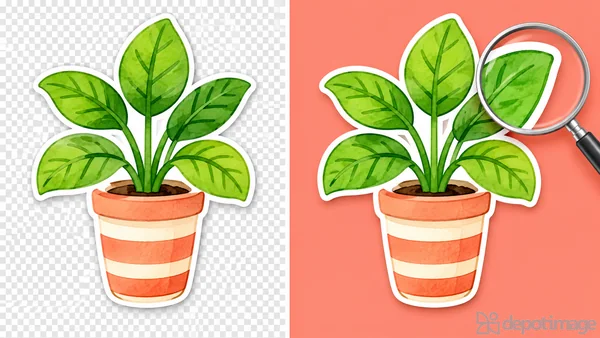
The fastest reliable test is to place the image on a solid dark or colored background. If the squares or a white box stay visible, they are real pixels. If the colored background shows through the empty areas, the file is genuinely transparent.
Watch for These Warning Signs
- A visible gray-and-white grid that stays when you change the background.
- A white or black rectangle around the subject on a dark or colored page.
- A file that looks fine on a white web page but shows a box elsewhere.
- Jagged or glowing edges when placed on a new color, which suggests a rough cutout.
Why Your Transparent PNG Has a White Box (and How to Fix It)
Common Causes
- Baked-in checkerboard: The pattern was saved as part of the picture, often from a screenshot or preview image.
- Wrong export settings: The background layer was left visible, or the export option for transparency was off.
- Converted format: The file was saved as JPG at some point, then renamed to PNG.
- Flattened layers: An app merged all layers onto a solid background.
How to Export a Transparent PNG Correctly
- Hide or delete the background layer so the editor shows the checkerboard.
- Choose PNG as the export format, not JPG.
- Turn on the transparent background option. In some tools this is a paid feature; Canva, for example, offers it with Canva Pro.
- If you see a choice, use a full-color PNG, often labeled PNG-24 or 32-bit. Some presets reduce transparency quality.
- Reopen the exported file over a colored background to confirm it worked.
If the only copy you have is a flattened image with a solid background, you will need a background removal tool or a manual cutout to create a new transparent file. A fake checkerboard cannot be turned into real transparency simply by renaming the file.
How to Use Transparent PNG Images in Your Projects
In Digital Designs
Place PNG images over backgrounds in presentations, social posts, thumbnails, and invitations. Layering lets you build scenes from separate pieces, such as a plant, a frame, and a pattern, without photo editing.
In Printables and Crafts
Transparent PNGs work well for greeting cards, planners, labels, and classroom materials. Keep in mind that transparent areas typically print as whatever paper you use, so a white sheet gives you a white background. For sharp results, use images with enough resolution for the size you plan to print.
On Websites and Blogs
PNG is a good choice for graphics with clean edges, but large PNG files can slow a page. If page speed matters, compress the file or consider WebP for the web version, and keep the PNG as your original.
Where to Find Free Transparent PNG Images
Before you download, check each image against a short list:
- It has clean edges with no white fringe.
- It shows real transparency when placed on a colored background.
- The resolution suits your planned size.
- The usage terms match your purpose.
Depotimage provides free PNG images, transparent background images, and clipart for personal, non-commercial use, which suits home projects, school activities, and personal designs. If you plan to use an image for business or resale, confirm the terms for that specific file first.
Conclusion
A transparent PNG is only useful when the transparency is real. Remember that the .png extension does not guarantee it, so test any new download on a colored background before you build a design around it. If a box or checkerboard appears, check the export settings, avoid saving through JPG, and re-export from a layered original when possible. With those habits, you can layer clipart freely, keep edges clean, and choose the right format for each project. When you need source images, Depotimage’s free PNG resources are a convenient place to start.
Frequently Asked Questions
What is a transparent PNG?
A transparent PNG is an image in the PNG format where some pixels are see-through, usually everything around the main subject. This lets you place the image over any color, photo, or pattern without a visible box. The transparency is stored in a separate alpha channel.
Why does my transparent PNG have a white background?
Usually the file is not truly transparent. It may have been saved from a JPG, exported with the background layer visible, or created from a preview with a checkerboard baked in. Re-export from the original layered file with transparency turned on, or recreate the cutout.
Is a gray-and-white checkerboard a real transparent background?
Only sometimes. Image editors show a checkerboard to represent transparency, but some files have the pattern painted into the picture. Place the image on a solid colored background. If the checkerboard remains, it is part of the image and not real transparency.
Can I print a transparent PNG?
Yes. The transparent areas generally print as the color of your paper, so on white paper they look white. For best results, use a high-resolution file and print a test page to check edges and color before printing the full project.
Is PNG or WebP better for transparent images?
Both support transparency. WebP often gives smaller files for websites and is supported by modern browsers, while PNG is the safer choice for downloads, editing, and printing because nearly every program opens it. Many designers keep a PNG original and use WebP only for web delivery.