You spend an hour on a graphic, upload it, and the platform chops off the headline. Or the photo looks sharp on your laptop and fuzzy on your phone. In almost every case the cause is the same: the image was the wrong size for that spot.
Each platform shows pictures in its own shape, and those shapes change every year or two. This guide collects the sizes that matter in 2026 for Instagram, Facebook, YouTube, Pinterest, X, LinkedIn, and TikTok, explains the traps (like cropped profile grids and hidden corners), and shows how to prepare one image that works almost everywhere.
Quick Cheat Sheet
| Platform | Format | Recommended size | Ratio |
|---|---|---|---|
| Feed post (portrait) | 1080 × 1350 px | 4:5 | |
| Feed post (square) | 1080 × 1080 px | 1:1 | |
| Stories and Reels | 1080 × 1920 px | 9:16 | |
| Feed link preview | 1200 × 630 px | 1.91:1 | |
| Page cover | 851 × 315 px | 2.7:1 | |
| YouTube | Thumbnail | 1280 × 720 px | 16:9 |
| Standard pin | 1000 × 1500 px | 2:3 | |
| X | Post image | 1200 × 675 px | 16:9 |
| X | Header | 1500 × 500 px | 3:1 |
| Shared link image | 1200 × 627 px | 1.91:1 | |
| Personal profile banner | 1584 × 396 px | 4:1 | |
| TikTok | Video and photo posts | 1080 × 1920 px | 9:16 |
Bookmark this table, then read the sections below for the details that decide whether a post looks professional.
Pixels, Aspect Ratio, and Resolution in 30 Seconds
Three terms come up in every size guide:
- Pixels are the width and height of your file, such as 1080 × 1350.
- Aspect ratio is the shape of the image. A ratio of 4:5 means the picture is slightly taller than it is wide, while 16:9 is the wide shape of a TV screen.
- Resolution is how much detail the file holds. A larger file is not automatically better, because platforms recompress what you upload.
If you get the aspect ratio right, the platform rarely crops anything. If you also match the pixel size, the picture stays sharp.
Instagram Image Sizes
Feed posts. The safest choice today is portrait. A guide on 2026 sizes recommends 1080 × 1350 pixels at a 4:5 ratio, because it fills the most screen and holds up when the profile grid is cropped. Square and landscape still work, but a portrait post takes up roughly 25 percent more vertical space than a square one on a phone, so it is harder to scroll past.
The grid change. Since a 2025 update, the profile grid previews posts at a 3:4 ratio instead of a square. Keep the main subject and any text near the center so that the grid preview does not slice off an important edge.
Landscape. A wide post is 1080 × 566 pixels. It works for reused blog banners, but it is the smallest shape in the feed.
Stories and Reels. Use 1080 × 1920 pixels. Leave breathing room at the top and bottom, since about 250 pixels at each end can be covered by the app’s interface.
Profile photo. 320 × 320 pixels, displayed as a circle, so center your face or logo.
Facebook Image Sizes
Link previews and shared images. When you share a page, Facebook reads the image set on that page. The standard size is 1200 × 630 pixels. If you run a blog, set your featured image to this size.
Feed photos. Vertical posts at 1080 × 1350 pixels and square posts at 1080 × 1080 pixels both display well. Portrait uses more of the mobile screen.
Page cover. The recommended upload is 851 × 315 pixels, but the cover is cropped differently on each device. Place the logo and key words in the middle and leave generous margins.
Events. Event covers were reported to have moved to 1920 × 1005 pixels in 2024.
Profile photo. 320 × 320 pixels, displayed as a circle.
YouTube Thumbnail Size
The standard is 1280 × 720 pixels at 16:9, with a minimum width of 640 pixels and a file size under 2 MB. JPG, PNG, GIF (not animated), and BMP are accepted. JPG is usually the easiest way to stay under the limit.
Two details catch many creators:
- The timestamp badge. YouTube places the video length in the bottom-right corner, so text or faces placed there get partly hidden.
- Tiny display sizes. Thumbnails can appear as small as about 116 × 65 pixels on mobile. Shrink your design to that size before uploading. If you cannot read it, viewers will not either.
Some designers work at 1920 × 1080 for extra editing room, which is fine if the exported file still respects the 2 MB limit. For Shorts, use a vertical 9:16 shape (1080 × 1920 recommended).
Pinterest Pin Size
Pinterest favors tall images. The recommended standard pin is 1000 × 1500 pixels at 2:3. Going much taller can backfire: pins beyond about 1000 × 2100 pixels risk being truncated in the feed.
Pinterest also folded Idea Pins into a single unified Pin format in 2023, so there is no separate size to remember. A vertical pin can use 1080 × 1920 pixels.
Because most pin impressions come from search rather than followers, the picture must explain itself quickly. A guide on pin design suggests a short, high-contrast text overlay of roughly four to eight words and one clear subject. Files can be JPG, PNG, or WebP.
X (Twitter) Image Sizes
- Post images: 1200 × 675 pixels (16:9).
- Header banner: 1500 × 500 pixels (3:1).
- Profile photo: 400 × 400 pixels, shown as a circle.
On the header, your profile photo overlaps the bottom-left area, so keep logos and text toward the center or right.
LinkedIn Image Sizes
- Shared link image: 1200 × 627 pixels.
- Personal profile banner: 1584 × 396 pixels.
- Profile photo: 400 × 400 pixels.
- Single square post: 1200 × 1200 pixels, and for carousels or document posts 1080 × 1350 pixels.
A warning about company pages. Published guides disagree on the company cover size: one cites 4200 × 700 pixels, while another lists 1128 × 191 pixels. Both are about 6:1. Since the two numbers conflict, check the upload prompt inside LinkedIn’s own page editor before you design that banner.
TikTok Image and Video Size
TikTok is built for tall, full-screen content. Use 1080 × 1920 pixels at 9:16 for videos. Photo posts that swipe like a carousel also use 1080 × 1920 pixels. Keep captions and faces away from the very top and bottom, where buttons and text from the app sit on top of your content.
One Master Image, Many Platforms
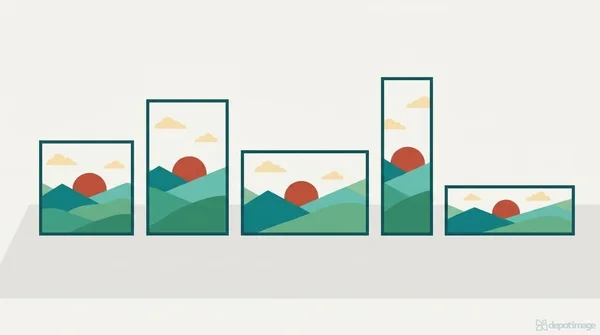
You do not need seven separate designs. Try this workflow:
- Start with a 1080 × 1350 canvas (4:5). It suits Instagram, Facebook, and LinkedIn carousels.
- Keep everything important in the center. Think of a safe area about 80 percent of the width and height.
- Make a 1080 × 1920 version for Stories, Reels, and TikTok by extending the background upward and downward rather than stretching the picture.
- Make a 1280 × 720 or 1200 × 630 version for thumbnails and link previews by cropping the same design horizontally.
- Add a 1000 × 1500 version for Pinterest with a short headline.
A transparent PNG cutout is useful here because you can drop the same subject onto different backgrounds and shapes. Our tutorial on [removing an image background for free] shows how to prepare one. (Link to your remove-background article here.)
Safe Zones: Where Text Gets Hidden
Every platform covers part of your image with its own interface. A reliable habit is to keep important elements away from the outer edges.
| Platform | Area to avoid |
|---|---|
| Instagram Stories and Reels | Top and bottom edges (profile name, reply bar, captions) |
| YouTube thumbnail | Bottom-right corner (duration badge) |
| X header | Bottom-left (profile photo) |
| Facebook page cover | Edges, which crop differently on mobile and desktop |
| TikTok | Right side and bottom (buttons and caption) |
| Instagram grid | Left and right edges (3:4 crop) |
How to Resize Without Losing Quality
- Start big, shrink later. Enlarging a small image makes it soft. Reducing a large one keeps it crisp.
- Crop, do not stretch. Squeezing a photo to fit distorts faces and logos.
- Export at the exact size. Platforms recompress files, so a precise upload gives you the best result.
- Pick the right format. JPG suits photos and keeps files light. PNG suits graphics, text, and transparency. WebP gives small files and is accepted on some platforms, but check the upload rules first.
- Watch the file size. YouTube’s 2 MB thumbnail limit is the one that surprises people most.
- Preview on a phone. Most viewers will see your image on a small screen.
Common Mistakes
- Uploading a landscape picture to Stories and ending up with black bars.
- Putting a headline in the corner where a timestamp or profile photo will cover it.
- Using a tiny profile photo that turns blurry in a circle.
- Forgetting to set the featured image of your website to 1200 × 630, so link shares look random.
- Reusing one banner for a personal profile and a company page.
- Trusting a size from an old article without checking.
Frequently Asked Questions
What is the best image size for Instagram in 2026?
For feed posts, 1080 × 1350 pixels (4:5) is the recommended default. Use 1080 × 1920 for Stories and Reels.
What size should a YouTube thumbnail be?
1280 × 720 pixels at 16:9, under 2 MB, with a minimum width of 640 pixels.
What is the ideal Pinterest pin size?
1000 × 1500 pixels at a 2:3 ratio. Avoid going much taller than that.
What size is a Facebook link preview image?
1200 × 630 pixels. Set it as the featured or social image on your page.
Do image sizes change often?
Yes. Platforms adjust layouts, grids, and ad formats regularly, and different guides sometimes disagree. Treat any size list, including this one, as a starting point and confirm it inside the platform before a big campaign.
Can I use the same image on every platform?
You can reuse the same design, but not the same file. Create a master image and crop it into each shape.
Final Thoughts
Correct sizes are a small detail that makes content look professional. Remember the core set: 1080 × 1350 for feeds, 1080 × 1920 for vertical video, 1280 × 720 for YouTube, 1000 × 1500 for Pinterest, and 1200 × 630 for link previews. Design in the center, keep text out of the corners, and check the result on your phone. Do that, and your pictures will look the way you intended on every screen.
Sizes were checked against several 2026 guides at the time of writing, and some details differ between sources. Confirm exact requirements in each platform’s upload screen or help center.